GitHub Pagesにデプロイする
このページでは、GitHub Pagesにデプロイする方法を見ていきます。最初からCloudflare Pagesに公開する場合は飛ばして構いません。また、公開は後回しにするという人も飛ばして構いません。いつ戻ってきても大丈夫です。このページは、Svelteの公式ドキュメントを参考にして書かれているので、こちらも参照してみてください。
0.はじめに
GitHubのリポジトリ名が(ユーザー名).github.ioとなっており、リポジトリがpublic担っていることを確認してください。リポジトリ名に関しては、違うものでもなんとかなりますが、Webサイトのページ遷移が少々めんどくさくなります。やり方は各自調べてください。
1.adapter-staticの使用
まずは、以下のコマンドを実行してadapter-staticをインストールしてください。
npm i -D @sveltejs/adapter-staticできたら、プロジェクトのルートにあるsvelte.config.jsの内容を以下のものに書き換えます。
import adapter from '@sveltejs/adapter-static';

/** @type {import('@sveltejs/kit').Config} */
const config = {
	kit: {
		adapter: adapter({
			fallback: '404.html'
		}),
		paths: {
			base: process.argv.includes('dev') ? '' : process.env.BASE_PATH
		}
	}
};

export default config;
そしたら、src/routes/+layout.jsというファイルを追加し、以下の1行を書きます。
export const prerender = true;2.GitHub Pagesのworkflowを追加
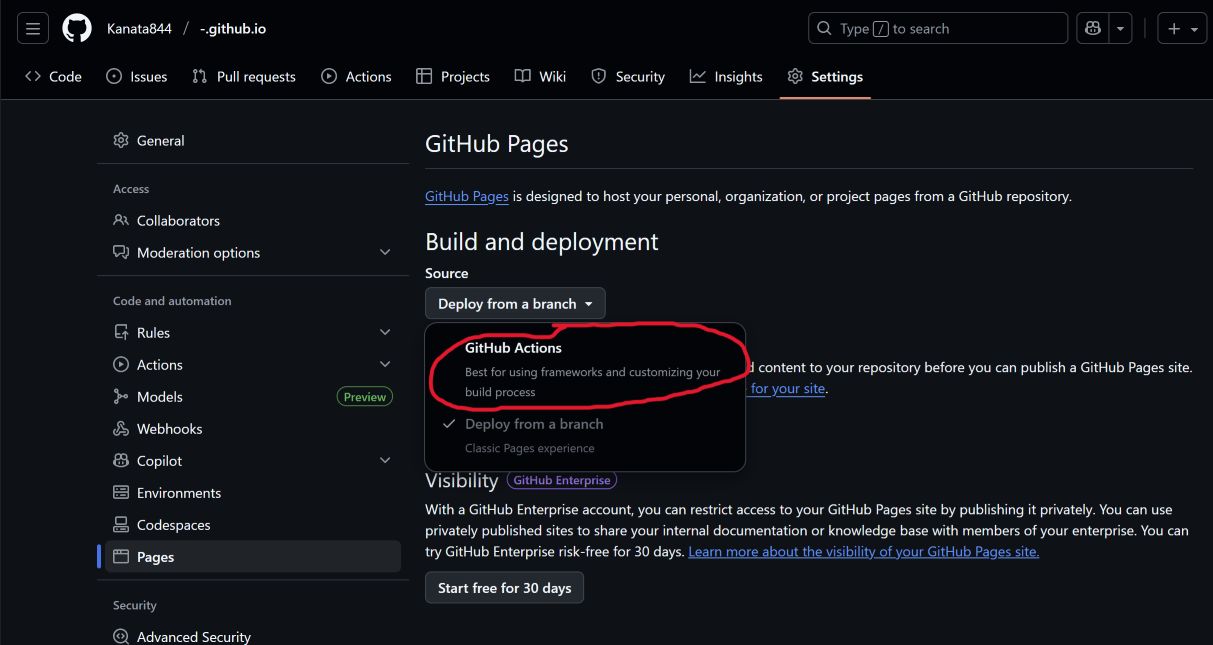
ここまでやったら、GitHubでこのプロジェクトのリポジトリを開き、一番右のSettingsの欄からPagesを選択し、sourceをDeploy from a branchからGitHub Actionsに変更します。
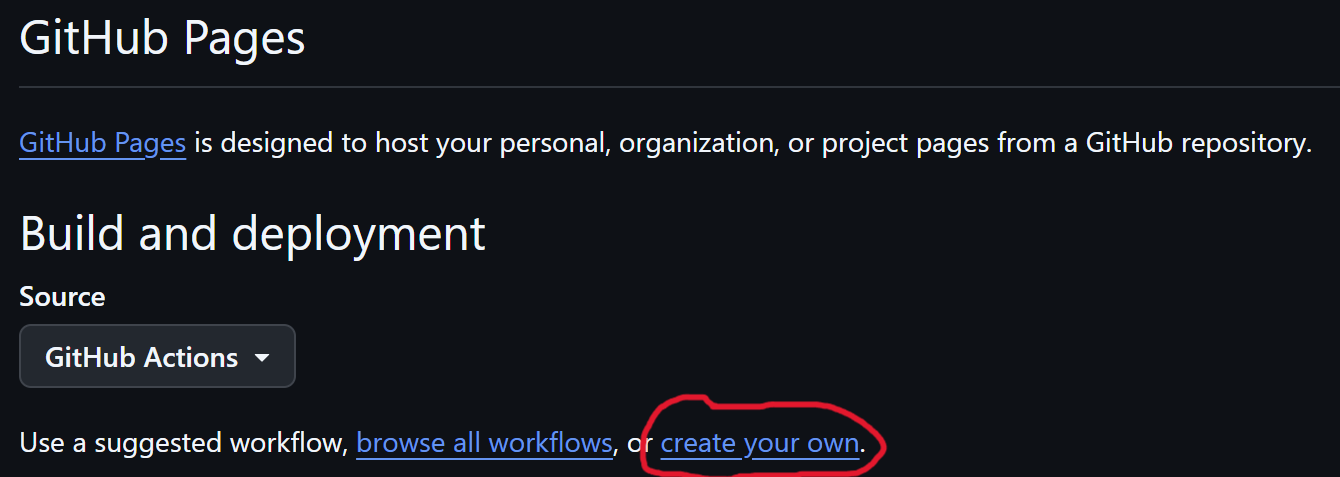
できたら、Build and deploymentのcreate your ownを選択します。
そしたら、出てきた画面にこのコードを貼り付けてください。ファイルの名前はdeploy.ymlにでもしといてください。(.ymlなら何でもいいと思います。)できたら、右上のCommit changes…を押してください。
name: Deploy to GitHub Pages

on:
  push:
    branches: 'main'

jobs:
  build_site:
    runs-on: ubuntu-latest
    steps:
      - name: Checkout
        uses: actions/checkout@v4

      # If you're using pnpm, add this step then change the commands and cache key below to use `pnpm`
      # - name: Install pnpm
      #   uses: pnpm/action-setup@v3
      #   with:
      #     version: 8

      - name: Install Node.js
        uses: actions/setup-node@v4
        with:
          node-version: 20
          cache: npm

      - name: Install dependencies
        run: npm i

      - name: build
        env:
          BASE_PATH: '/${{ github.event.repository.name }}'
        run: |
          npm run build

      - name: Upload Artifacts
        uses: actions/upload-pages-artifact@v3
        with:
 # this should match the `pages` option in your adapter-static options
          path: 'build/'

  deploy:
    needs: build_site
    runs-on: ubuntu-latest

    permissions:
      pages: write
      id-token: write

    environment:
      name: github-pages
      url: ${{ steps.deployment.outputs.page_url }}

    steps:
      - name: Deploy
        id: deployment
        uses: actions/deploy-pages@v4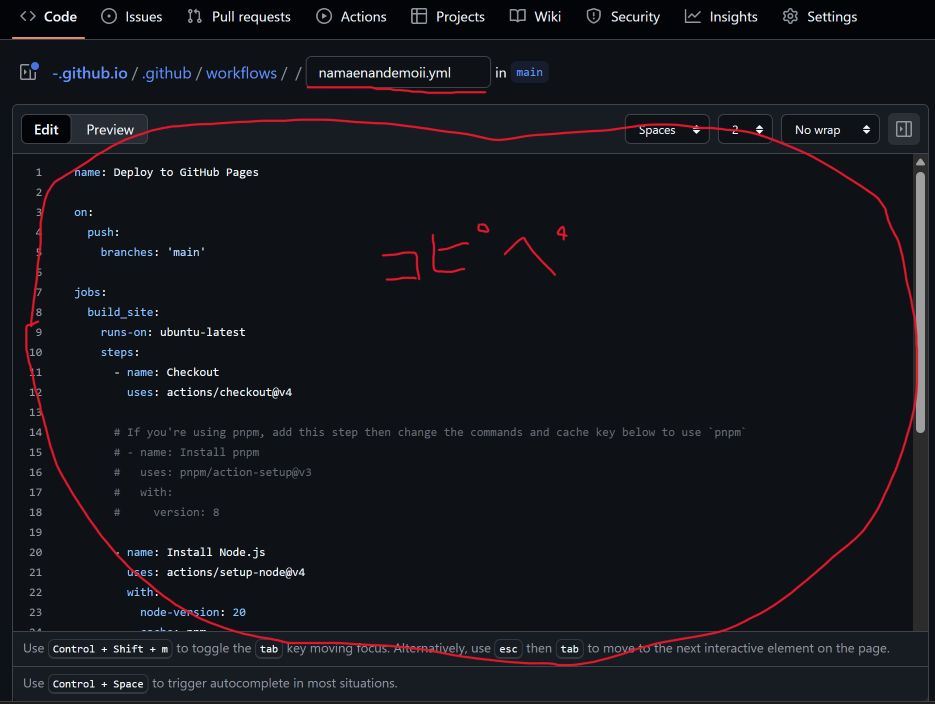
そしたら、ローカルのターミナルに戻って、以下のコマンドを順番に打って、リモートの変更をローカルに反映させ、更にローカルの変更もリモートに反映させます。
git pull origingit add --allgit commit -m "何らかのコミットメッセージ"git push origin HEADうまく行っていれば、サイトがhttps://(ユーザー名).github.ioで公開されていると思います。